
Archive | July, 2008

Olive – a sneak preview

28 Jul

Thank you all so much for your interest in Olive, it’s great to have you here. Olive is currently in private beta and there’s lots of things that need adjusting before public release, however for those who are interested, here’s a little sneak preview video, a very quick run down of the basics of Olive.

The video doesn’t go into the credit system that much as Paypal is still in sandbox mode for testing however, you should get a good idea of how you can use Olive with the day to day running of your business.


Olive – preview from Sarah Parmenter on Vimeo.

Olive – a web app for web designers

22 Jul

About 6 months ago I found myself hunting for an app that did just what Olive is going to, I couldn’t find one so I set about developing it.

Olive is a web app that allows designers to bolt on additional maintenance services quickly and easily, thus quickly increasing your monthly income with your clients. I’m very excited about Olive, it’s an easy, intuitive solution that fills a void. The chances are you possibly already offer your clients web design maintenance contracts, if you don’t, Olive is the perfect excuse to start.

If you do already have maintenance clients you will be familiar with the amount of emails you get in relation to a single update, they’ll first send you an email to say they need an update, you’ll then send an email back asking for the files before you can quote, they will send you an email with the files, you’ll send an email back with the quote for the amount of time it will take you, they will send you an email accepting and saying go ahead, then give it a day or so, and they’ll be emailing you to ask when they should expect their update completed. That’s a lot of inbox clogging for just one client!

‘Olive’ gives your client a “one click” access to your services with a custom branded app that suits your business branding. Your client will log in, type their update, attach associated files which get sent to you – you will receive a notification in your dashboard with the files and what the update is, you will then assign how many credits the update will need. Credits? I hear you say….what are these credits you speak of?

Olive works on a unique pay as you go system, you set how much a credit is worth to you ie. 1 credit = £10.00 ($ or €). Your clients can pre-pay blocks of credits to use with the services you provide, you can also set a client as “unlimited” and set your monthly charge for unlimited access accordingly. This captures both types of common client, the one who does not want to be on a rolling monthly contract for small frequent updates, and those who do. You may choose not to use the unlimited feature at all and simply use it as a “pay as you go” system. For example, the pay as you go clients may need you to fix something they have broken using their CMS system (we’ve all been there!) or create a new graphic for a promotion they are running, perfect – introduce them to the ‘pay as you go system’ and keep all their requests in one place. You can also use the credit system for client support, lost password requests or changing name servers for example, set the amount of credits that suit you.

The beauty of Olive is the simple interface client side, this gives them all the information they need about their updates at a click. Lights next to their updates mean different things, red means it’s been sent to you, the designer, and is pending credit allocation, yellow means it’s being worked on and green, completed. No more emails back and forth, they can log-in 24/7 and see the status of any given project at any time.

As an Olive user, you will have your own unique sub domain name, set by you at sign-up, to point your clients to, you can also upload your own logo and customise the overall look of the app to suit your business. I’ve realised how important this is as a designer myself. Your dashboard shows you all incoming updates and the status of those updates in one easy to view screen, you can also message the client and receive client messages on each update request. You can also add additional users for use with other designers in your office or freelancers should you wish.

Olive can literally be what you want it to be, a credit can be £40 for one designer and £1 for another – use it for web design maintenance or client support, it can be used for any service you want to provide to your clients. Your clients will love the informative interface, simplicity of updating and the feeling of having you at their fingertips. You will love the ease of having everything in one place, a clearer inbox and getting paid right away for the updates in your dashboard. Create your own custom packages and advertise them to your clients, for example; new image creation 5 credits, name server change 2 credits. Advertise in your next newsletter or send an email out to all your clients, manually add a few credits to their account as a promotion to get the ball rolling, I guarantee from my personal experience, they will love it!

To summise, Olive is a great way to increase your monthly income, using the skills you already have to sign up clients who feel a monthly maintenance package may be too expensive for them or not the right solution, for the few updates they need per month, but a quite a few clients with a few updates per month equates to many pounds in your pocket!

Olive will be available to beta testers shortly and general release in the next month.

Thank you for reading, I really appreciate the interest you’ve shown.

Olive Website

The Olive website is currently under construction aka. fiddling.

Why design competitions are bad news for everyone.

19 Jul

Last week after hearing a few comments fit for clientcopia.com from one particular client, I decided that I should start working out the 20% of my clients who bring in 80% of my revenue and focus on giving them a brilliant service, rather than having to justify why I have to charge for my services (yes, I really had to have that conversation with someone). Dropping your problem clients might make you happier but even the low yielding clients are bringing in income, and this income needs to be replaced. 

I decided to ask a few internet friends their thoughts on job boards and whether the calibre of client on the boards are the type we’d all love to have. The good news is, apparently there are some lurking in there. 

Out of the really helpful links that were sent to me by various people one that came up was 99designs.com. I clicked, looked at it and it immediately got my goat (not the fault of the person who sent it to me I hasten to add). A design contest, and not a small one a “thriving community of 15,689 talented designers” at that.

These 15,689 people are committing designers sin as far as I’m concerned. If a client said to you “Right, design me a logo, I want you to spend around 10 hours of your time on it, I want you to be at my beck and call day and night when I submit revisions and I want those revisions the next day….oh and I’ve got 10 other people doing the same thing BUT if I like your design, you’ll get paid a mediocre fee at the end.” – What would you say? I fear my response would be a little less than lady like and start with an “f”, however a simple “no” would suffice.

I have more experience than most when it comes to design contests. I used to share an office with a guy who used to do these as his main source of work. I’d watch him tear his hair out and bust a gut doing revisions and new logos, stay up late into the night to watch for other submissions and revision sets from clients in the USA and only to find more often than not, he wouldn’t win or if he did it was around £80. The upshot of this was he couldn’t afford his rent and he moved out – and, he was a good designer! By doing this he essentially hindered his own success, judging by his website 4 years later, he still hasn’t learnt. 

When you are in the creative field your actions can directly affect another designer, you have programmed a client to think that the above is acceptable for a tiny fee, you have also introduced them to the world of spec work. 

I recently lost out on a project due to the client wanting to see the entire website built before he decided whether he would pay for it, oh and he found someone who would do it for £150 – probably someone from 99designs.com. I’m not sad to have lost this client however the designer that did take him on should know better. Why is it deemed acceptable to do spec work at all? Even when we go to a restaurant and have a meal that we don’t like, we’ll complain, we’ll moan that we’ll never go back there and what dreadful service we had but 9/10 we pay for it! 

The biggest question we face as designers when submitting proposals is “Ok, but what if I don’t like what you’ve done?” – your response will never be “Then don’t pay for it”. Design is a skill, a skill that many people do not have, you deserve to be recompensed for that skill the same a plumber or electrician would. If you have a design brief that can be sent out via email, send it and then go through the brief with the client over the phone. Ensure the client has filled out or discussed the design brief in full and not with one word answers, then you should have no problem and can tell the client this. A design brief will be your bible for each client and also gives you a benchmark of which to refer to when the client says “It’s too red” and they’ve written “Must be red”.

I’d like to refer to a paragraph from the American Institute of Graphic Arts (AIGA) published article Design Business and Ethics – “The AIGA Standards of Professional Practise”.

“A designer shall not undertake any speculative projects, either alone or in competition with other designers, for which compensation will only be received if a design is accepted or used. This applies not only to entire projects but also to preliminary schematic proposals.” 

It’s in there for a reason – stick to it! 

In short, design competitions breed a bad client. This client will know he can push you around, expect work at a similar or lower price in the future, probably expect work to be free at some stage with promises of ongoing future work, or exploit your “spec” work to someone who will charge them less than you, and remember, there will always be someone who charges less than you. Educate your clients as to why you are worth the fee you are asking, set a benchmark price that you are not willing to go under, ever, and stick to it.

Oh and find the 15,689 designers on 99designs.com and tell them too… it’ll do us all a favour.

My Holiday Reading

14 Jul

So, I’ve just freshly jumped off the plane from Malaga back to cold old blightly. I took some interesting books on holiday with me but some were far better than others. The first book I delved into was one I bought at the airport ‘Focus – The Power of Targeted Thinking‘ – I was really excited, grabbed a glass of Tinto de Verano and within 5 minutes was already bored of reading it. Nothing about it was grabbing, you’d spend more time over evaluating yourself on paper with the use of the diagrams and flow charts than actually just getting on with your work.

A classic example was “Name five times you have been productive, now evaluate what was different about these projects and times when you haven’t been productive”. I’d be there all day! The Four Hour Work WeekIn web design, you are constantly having to battle with a barrage of distractions, clients on the phone, clients on email, clients on your mobile (god forbid!), and…our incessant need for coffee/starbucks/food/twitter.

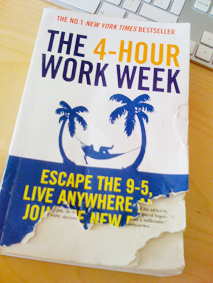
So, I got to page 57 or something ridiculously low and put the book down (I finished it after I read the 4 Hour Work Week, it didn’t get any better!) and picked up a book that I nearly didn’t take away with me, that I’ve had for ages “The Four Hour Work Week”. Tim got straight to the point and summed up nearly the whole book of “Focus” with – “say to yourself, if this task is the only task I get done today – will I be satisfied”, and “busyness is a form of laziness”.

What a totally different kettle of fish Tim was, I couldn’t put it down and found it a really inspiring way to deal with some of the above problems and distractions we all face on a day to day basis. Some of the most poignant chapters were the section about outsourcing, which could work extremely well if you found someone reliable and did want to travel the world for a while. The chapter on “Interrupting Interruption” said you should only check your emails twice per day (Midday and 4pm), the same with your phone to allow you to batch tasks together, be more productive and get your work done without interruption. I have already spoken with Leanda on Twitter who is saying it’s made a massive difference to her productivity.

As far as only working 4 hours per week, I looked into some of the sources available in the book and Tim Ferris has done extremely well from a body supplement called “brainQUICKEN”. I don’t know whether it was already a product and he has aquired the licence for it or as I think, it was made from scratch. Either way, it’s a unique product. Finding a unique product nowadays is becoming increasingly harder, especially on the likes of ebay where price is a residing factor. Dropshipping sources are also becoming less reliable with many new websites springing up charging people for “reputable” dropshipping companies that sell nothing more than “toot” you’d get at a local foreign market (not knocking those though, I got a great Olive dish in Caleta once!).

To sum up, this is a really great book to read if you feel like you need a kick up the bottom to be productive, the words “be productive, not active” have stuck with me, and how true they are, I feel like I have a fresh appraoch to my work that I didn’t previously. As Tim says, just because the world has decided that 8 hours per day is what is to be set in stone the world over as “work time” – doesn’t mean you have to adhere to it.

My book has now been eaten by my puppy, and dropped in the mediterranean sea, otherwise, I’d lend it to you…

My other holiday reading consisted of: